
Online SEO audit. Find the issues holding back your website.
Not getting the Google visibility you expect? Review technical issues, indexability, content and links in one place. Turn audit findings into a clear list of improvements to prioritize.
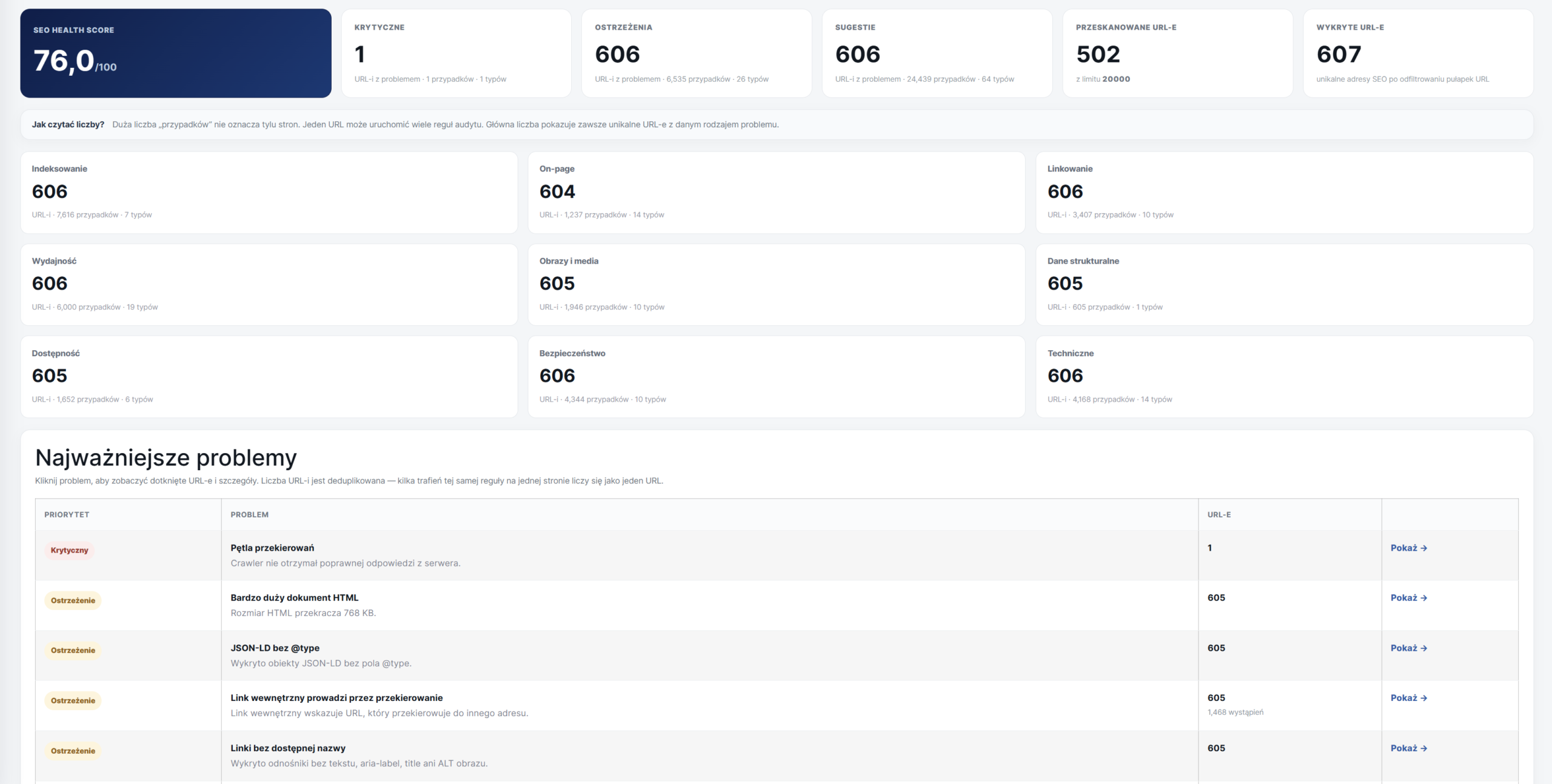
What does an online SEO audit check? Six areas that matter
No single metric tells the whole story. Use these six areas to organize a practical review of your website. The checks available for a particular URL depend on what the tool can access and the information your website exposes.
Crawling and indexability
Check whether important pages can be reached and whether they have been blocked accidentally. Look at HTTP responses, robots directives, noindex settings and canonical URLs. Even excellent content may not appear in search if key pages are excluded.
URLs and redirects
Find broken pages, unnecessary redirect chains and duplicate URL variants. A logical site structure makes navigation easier for people and crawlers. After a redesign, pay special attention to redirects from old pages to appropriate new destinations.
Page titles and headings
Review title tags, meta descriptions and the H1–H3 hierarchy. Missing, duplicated or misleading text can undermine clarity. Titles should explain a page’s purpose; headings should guide readers instead of mechanically repeating a keyword.
Content and search intent
Content quality cannot be measured solely by word count or keyword density. Evaluate relevance, completeness, originality and whether the page genuinely helps its audience. Audit findings help identify pages worth a closer editorial review.
Internal links and navigation
Check how important pages are connected, how links are described and whether visitors can reach related information easily. Relevant internal links help users navigate and can help crawlers discover your content.
Images and performance
Review meaningful image alt text, file sizes and basic performance signals. For a fuller speed assessment, complement the audit with PageSpeed Insights and Core Web Vitals data.
What is an SEO audit and when should you run one?
An SEO website audit reviews issues that can make it harder for search engines to discover, crawl, index and understand your content. It includes important URL signals, response codes, redirect paths, metadata, headings and internal linking, alongside wider content considerations.
Rank tracking tells you where a page appears in search; an audit helps investigate what might be holding it back. It is especially useful before a redesign, after a migration, when organic traffic drops or when your website has accumulated many pages over time.
The goal is an actionable diagnosis
A useful report does more than count warnings. You should understand what the issue is, why it matters and what to investigate next. For instance, a confusing page title calls for reviewing search intent and the page’s real subject, not just adding more keywords to meet a target length.
Found issues? Prioritize fixes instead of guessing.
Connect technical analysis with a practical SEO improvement plan. Keep your findings and next steps inside SEO BOOK OS.
Explore SEO BOOK plans →↗Technical SEO audit: remove barriers before publishing more content
If a key category is marked noindex or the server returns an error, writing another article will not fix that fundamental issue. Start your technical SEO audit with accessibility, important URLs and recurring template problems.
Check your homepage, service pages, categories and key product URLs first. A defect in one template can affect dozens of pages at once, so try to identify patterns instead of fixing each URL independently.
Automated findings are the start of a diagnosis, not the final word. Validate important issues on the website itself and use Google Search Console to review the indexing status reported by Google.
On-page and content audit: answer the questions people actually ask
Search optimization goes beyond technically valid pages. Your content should help a visitor choose a service, compare an option or solve a real problem. Generic paragraphs with repeated phrases rarely provide the depth readers need.
Review page titles, headings and internal links. Ask whether the most useful information is easy to find, whether two pages compete for the same intent and whether product or service pages answer common buying questions. Some pages need consolidation; others need clearer examples and practical details.
An automated content audit does not replace editorial judgment. Use it to focus attention on pages that deserve a deeper review, not to rewrite every page to satisfy an arbitrary score.
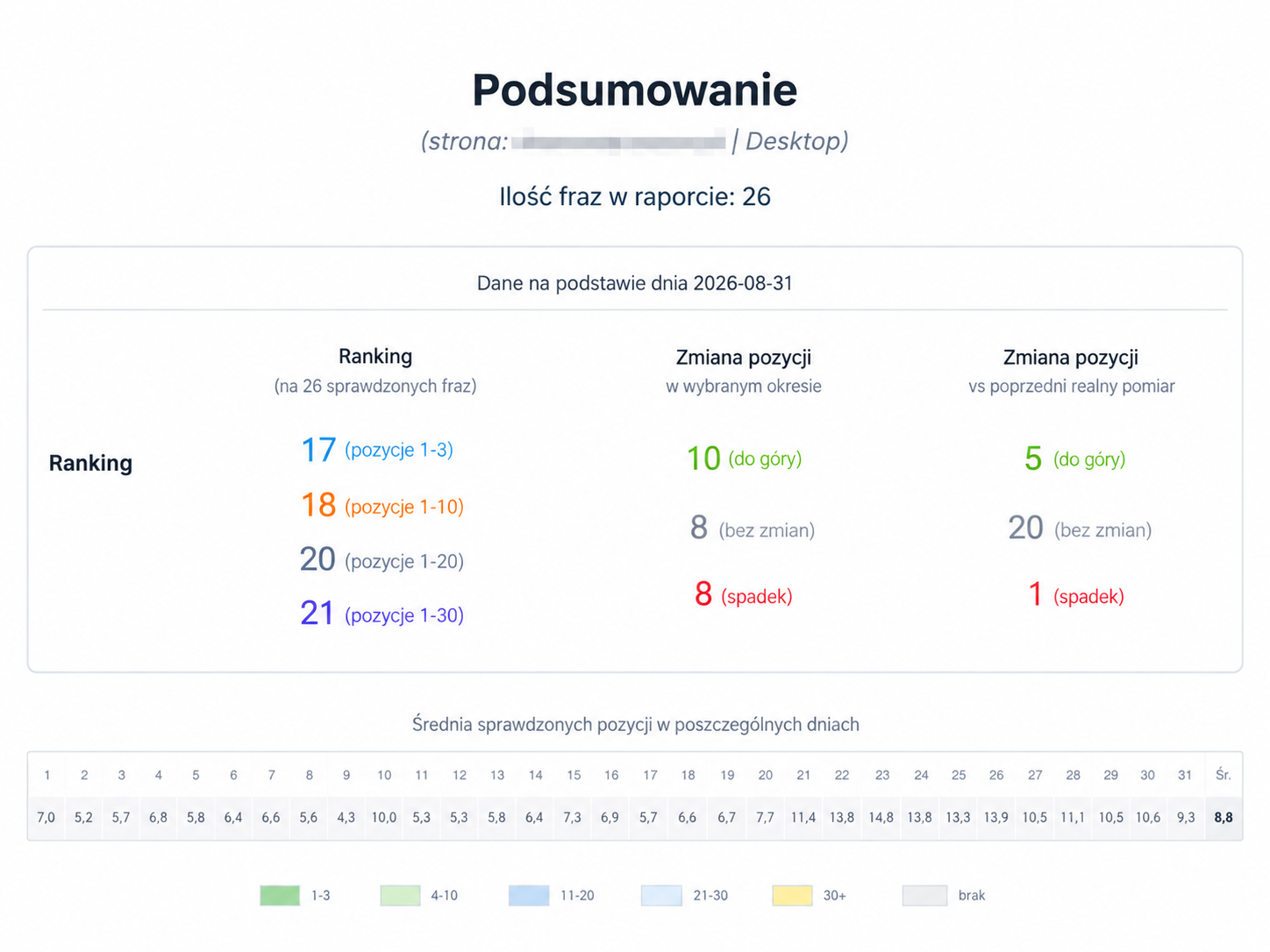
Turn your SEO audit report into a clear work plan
An audit report should make it easier to decide what to do next. SEO BOOK OS organizes findings for review, helps you document website issues and provides reporting tools you can use internally or share with a client.
Start with accessibility and indexation problems on high-value URLs. Then review recurring template defects, broken links and redirect patterns, followed by improvements to content, images and navigation. Exporting a PDF can help communicate progress and create a record of the initial state.
Do not judge the whole site by a single overall score. The impact of an issue depends on the affected URLs, how often it occurs and the role those pages play for users.
Example: how should you prioritize SEO fixes?
Imagine an e-commerce audit identifies the following three issues. This is an illustrative scenario, not a real customer case study. The order is based on likely impact and the number of affected pages.
An important category has noindex
Verify whether the exclusion is intentional. If the page belongs in search, correct the directive and check its indexing status.
High-impact indexability issue
Many products return 404
Investigate the cause, old URLs, redirects and internal links. One template or migration fix could resolve the problem across many pages.
Recurring technical problem
Category copy is too generic
Add useful buying guidance, specific answers and relevant links. This requires understanding the customer’s questions.
Content usefulness improvement
Fixes are only the beginning. Track their impact.
Review ranking changes after improving important pages.
Combine audit and tracking →↗How to perform an SEO audit in four practical steps
You do not need to rebuild the entire site immediately. A repeatable process and a written record of implemented changes are more valuable than a long list of unchecked warnings.
1. Set up the project
Add the domain and define the scope. Identify the most important page types, such as services, categories, products and articles.
2. Review the findings
Look at issue groups and example URLs. Distinguish confirmed errors from signals that need further verification.
3. Assign priorities
Address indexability and access on valuable pages first. Then fix widespread template issues and content gaps.
4. Check the outcome
After implementation, rerun checks within your plan limits and review Google Search Console alongside your rank tracking history.
SEO audit checklist: what should you verify manually?
Automated checks cannot understand every business requirement or website behavior. This checklist will help you discuss the next steps with a developer, content editor or SEO specialist.
Technical foundations
- Do important pages return HTTP 200?
- Do noindex and canonical values match the page purpose?
- Were old URLs redirected appropriately?
- Does the XML sitemap point to current URLs?
- Is the mobile experience usable and clear?
Content and user experience
- Does the title reflect what the page actually offers?
- Can people scan the page using helpful headings?
- Are customers’ key questions answered?
- Do images have useful alternative text?
- Is the next step clear for a visitor?
After the audit: measure outcomes rather than counting fixes
Fixing a technical issue does not guarantee a rankings jump the next morning. Google needs to process updates, and results also depend on content relevance, competitors and other signals.
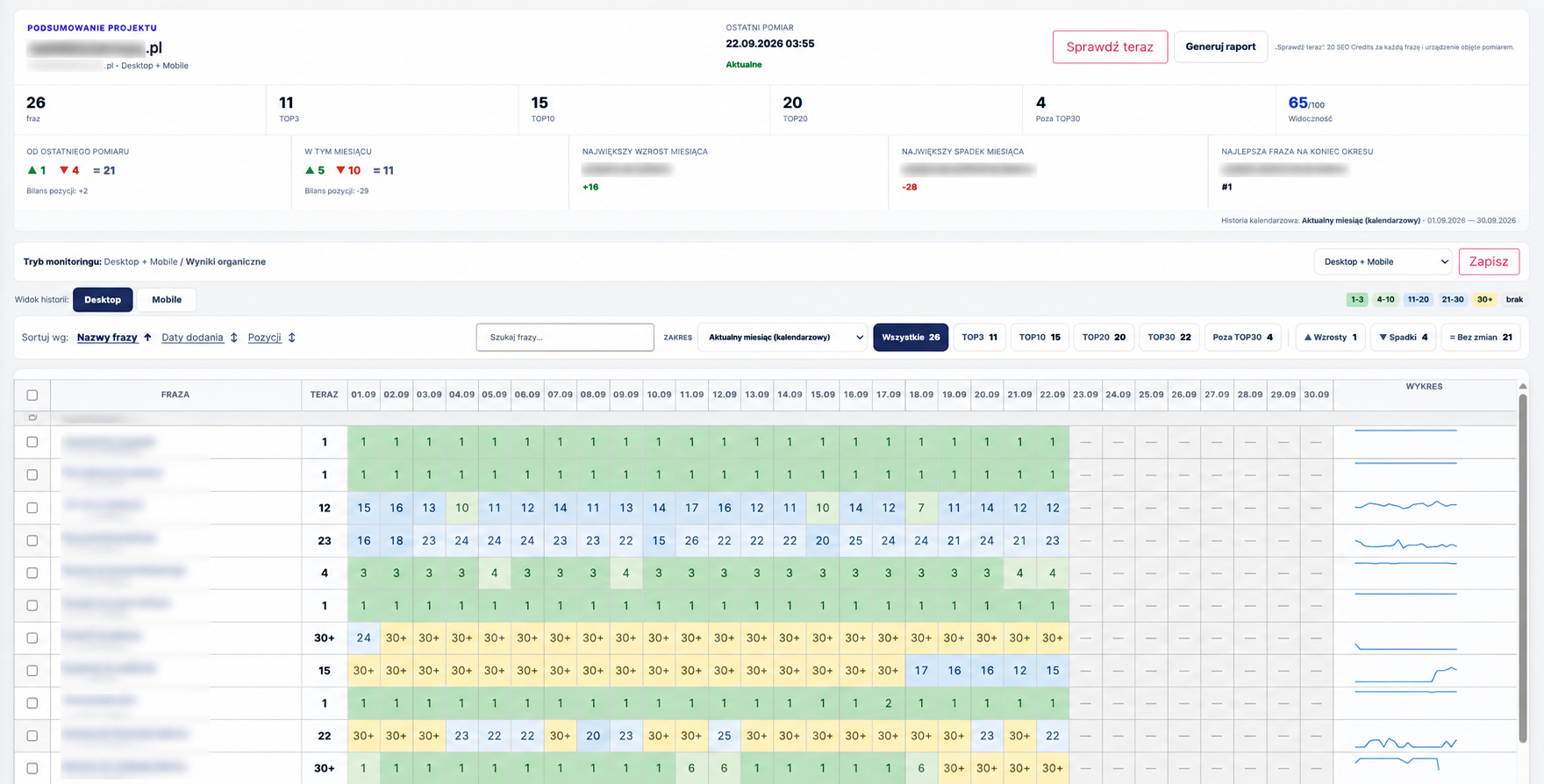
Keep a record of when changes go live, then track the rankings of relevant keywords. SEO BOOK OS combines audits with position history, trend comparisons and reports, so you can review changes over weeks instead of drawing conclusions from a single day.
For a broader picture, also check clicks and impressions in Google Search Console, and connect your conclusions to real leads or sales.
Who benefits from an online SEO audit?
A small business site and a store with thousands of products face very different challenges. Both benefit from an organized diagnosis and an understandable list of follow-up actions.
Business owners
Identify issues worth discussing with your website provider and gain a clearer view of your site’s health without learning every technical term.
Online stores
Review products, categories, redirects and recurring template issues. Prioritize fixes that affect large groups of URLs.
SEO freelancers
Start projects with a structured diagnosis and turn findings into actionable tasks and client-facing reports.
SEO agencies
Apply a consistent review process across multiple client websites. Project and audit limits depend on the subscription.
Better SEO work starts with a clear diagnosis.
Choose a subscription that fits your sites and audit needs.
Compare plans and features →↗How many website SEO audits are included in a plan?
Each paid SEO BOOK plan comes with a monthly audit allowance and a number of URLs included per audit. Extra audits or URLs beyond the allowance can use SEO Credits. Check the current detailed pricing before choosing your plan, especially for large sites.
START
1 audit/month · 100 URLs included
PRO
4 audits/month · 500 URLs included
BUSINESS
10 audits/month · 1,000 URLs included
FULL
30 audits/month · 3,000 URLs included
Extra audits or URLs above your plan allowance may use SEO Credits. The latest pricing page defines all current limits and terms.
Online SEO audit — frequently asked questions
What is an online SEO audit?
It is a structured review of website elements that may influence how search engines access and understand your pages. It covers technical signals, URLs, titles, headings and links, helping you identify problems and plan improvements.
Does an SEO audit guarantee better Google rankings?
No. It identifies potential obstacles, but search performance also depends on execution, competitors, content quality, search intent and the time needed for Google to process updates.
How long does a website audit take?
It depends on the number of URLs, server responsiveness and selected checks. A small website is usually quicker to assess than a large online store. Track progress and results in the tool.
Is an SEO audit included in the START plan?
Yes. The current START plan includes 1 SEO audit per month covering up to 100 URLs. Higher plans include larger allowances. Visit the current pricing page for details.
Which SEO issues should I fix first?
Start with crawlability, indexability and accessibility of important pages. Then address repeated template problems, redirects, internal links and content. The potential impact matters more than the number of warnings.
Can an automated audit find every technical issue?
No. Automation cannot understand all business requirements or user journeys. Complement it with manual checks, Google Search Console and dedicated performance tools.
Does the audit work for online stores?
Yes, for publicly accessible store pages. Large catalogs require particular attention to URL limits, filters, pagination, product variants and category architecture.
Can I export an SEO audit report?
SEO BOOK OS provides reporting and PDF export within the applicable feature and plan allowances. Use the report to communicate issues and document completed work.
Do I need to install software on the website?
A remote audit of public URLs does not require installing an additional plugin on the audited site. Applying fixes may require access to the CMS or hosting environment.
What does an on-page SEO audit include?
It examines page-level elements such as titles, descriptions, headings, content, images and internal links, checking whether the topic is expressed clearly and consistently.
How often should I audit my website?
Review the site after major template changes, migrations and content expansions, then periodically based on how often it changes and your plan’s audit allowance.
Does SEO BOOK replace an SEO expert?
No. It helps with diagnostics, monitoring and reporting. Strategy, content decisions and business priorities still benefit from professional judgment.
Start with your own website
1 project, 15 keywords and 1 monthly audit covering 100 URLs.
Choose START ↗See what changes in Google
Daily ranking checks, history and visibility trends.
Explore plans ↗Turn findings into better content
Write SEO content within your platform. AI actions use SEO Credits.
See available tools ↗Your audit, rank tracking, reporting and AI tools in one dashboard.
Find what is really holding your website back.
Choose your SEO BOOK OS plan, run an audit and organize the improvements that matter most.